

Yes, a smart thermostat is worth it in Florida when you want remote access, a schedule that fits your household, and humidity information from a compatible central AC system. It won't fix weak cooling or remove moisture by itself, and installation involves more than replacing the display on your wall. Choose it for better control, not a promise that your existing AC will cool better or deliver guaranteed savings.
- Is a smart thermostat worth it in Florida? Yes, for remote access and scheduling, provided your central AC is compatible.
- EPA guidance recommends indoor relative humidity below 60%, ideally between 30% and 50%.
- A humidity display measures moisture; it does not automatically provide humidity control.
- A.R. Williams Air Conditioning recommends checking AC compatibility before choosing a smart thermostat.
Is a smart thermostat worth it in Florida's heat?
A smart thermostat earns its place when it solves a control problem you actually have. Perhaps you forget to adjust the temperature before leaving, want to check a seasonal home remotely, or need a schedule that changes with your workday. Those are useful reasons to upgrade in 2026.
If your current thermostat already keeps you comfortable and you rarely change your routine, the benefit is smaller. You don't need an app to have a well-controlled home. Compare the features you will use with the setup and account management they require.
| Thermostat type | Best for | Main benefit | Main limitation |
|---|---|---|---|
| Basic thermostat | Homeowners who prefer direct manual control | Simple temperature adjustments | No automatic schedule or remote access |
| Programmable thermostat | Households with predictable routines | Changes temperature on a stored schedule | Schedule changes generally require local adjustments unless connected features are included |
| Smart thermostat | Homeowners who want remote access and flexible scheduling | Connected controls, with additional features depending on the model | Requires compatibility checks, setup, and an internet connection for remote features |
For Florida homes, thermostats for South Florida humidity control deserve particular attention. The important distinction is whether a thermostat merely shows humidity or can work with your equipment to manage it.
Why this matters in a humid home
Temperature and moisture are separate comfort concerns. Your living room can reach its temperature setting and still feel clammy. Lowering the thermostat repeatedly doesn't explain why that is happening.
For your 2026 comfort checks, use the EPA's indoor air quality guidance as a reference: keep indoor relative humidity below 60%, ideally between 30% and 50%. Relative humidity describes how much moisture the air holds compared with what it can hold at that temperature. It changes with both moisture and temperature, so a reading needs context.
A smart thermostat with a humidity sensor helps you notice a pattern. It doesn't tell you whether the cause is outside air entering the house, an airflow problem, or equipment operation. Persistent dampness needs a system assessment rather than a more aggressive temperature setting.
This matters in seasonal homes that sit empty through humid weather. Remote readings give you information you wouldn't otherwise see while away. They still need a response plan, because an alert cannot inspect a drain line or repair a failed component.
Where a smart thermostat helps most
Remote access: best for seasonal residents
Remote access lets you check and adjust your thermostat without standing in front of it. That is useful when you leave a home unattended or return on a different day than planned. Confirm exactly which readings and alerts the model provides before choosing it.
The limitation is dependence on the home's connection for remote functions. A working phone app does not prove every room is comfortable, and a disconnected app does not necessarily mean the AC has stopped. Ask how local temperature control behaves if the internet connection is lost.
Flexible scheduling: best for changing routines
A schedule helps when your household has clear occupied and unoccupied periods. A smart thermostat makes adjustments accessible from your phone, while some models offer learning or location-based features. Those features differ, so check the manufacturer's documentation rather than assuming every smart thermostat includes them.
Automatic changes also need to fit your household. Someone working quietly in a home office shouldn't lose comfortable cooling because an occupancy feature interprets limited movement as an empty house. Choose settings that match how people use the home, then review what the thermostat actually does.
Room sensors: best for a temperature mismatch
Compatible room sensors give certain thermostats temperature information from somewhere other than the hallway. That helps when the thermostat's location doesn't reflect the room you use most. Check whether the system averages readings, follows a selected sensor, or uses a schedule to change its reference point.
A sensor does not create a separate cooling zone. If an upstairs bedroom is warm because of duct restrictions or heat entering through the roof, changing the reference temperature doesn't repair that problem. Other rooms can become colder while the underlying imbalance remains.
What a smart thermostat cannot fix
A thermostat tells compatible equipment when and how to operate. It does not add cooling capacity, clean a coil, or correct a refrigerant problem. If your AC runs without reaching the setting, establish the cause before treating a new thermostat as the solution.
Older houses sometimes have return-air paths that don't suit the current system. A return carries room air back to the indoor equipment; restrictions affect airflow. A better display on the wall doesn't increase the size of that path.
Near the coast, salt air can corrode outdoor coils. That is an equipment condition, not a scheduling problem. The same distinction applies to a clogged filter, damaged ductwork, or water backing up in the condensate drain.
A thermostat fault can cause cooling problems, but it needs diagnosis too. Ask the technician to distinguish a bad temperature reading or control signal from an AC problem. Replace the part that explains the symptom, rather than assuming the newest thermostat is the answer.
Why a smart thermostat's value varies
The value of a smart thermostat depends on your home and equipment, not Florida heat alone. These factors make the difference:
- Equipment compatibility: The thermostat must support your AC's control requirements. Some advanced systems require their matching controller to retain intended functions.
- Available wiring: Power and control wiring must meet the thermostat manufacturer's requirements. Wire colors alone don't establish compatibility.
- Household routine: Remote controls and scheduling help most when you have a practical reason to adjust settings away from the wall.
- Humidity needs: A humidity reading is useful information, but active moisture control requires compatible equipment and correct setup.
- Thermostat location: Sunlight, nearby heat sources, and poor placement can make the reading unrepresentative of the rooms you use.
- Connectivity preferences: Connected controls require account and network management. A simpler thermostat suits someone who doesn't want those responsibilities.
For a 2026 purchase, compare the exact model's installation instructions with your equipment documentation. A feature listed on the box is not proof that your system can use it.
How to choose without buying the wrong control
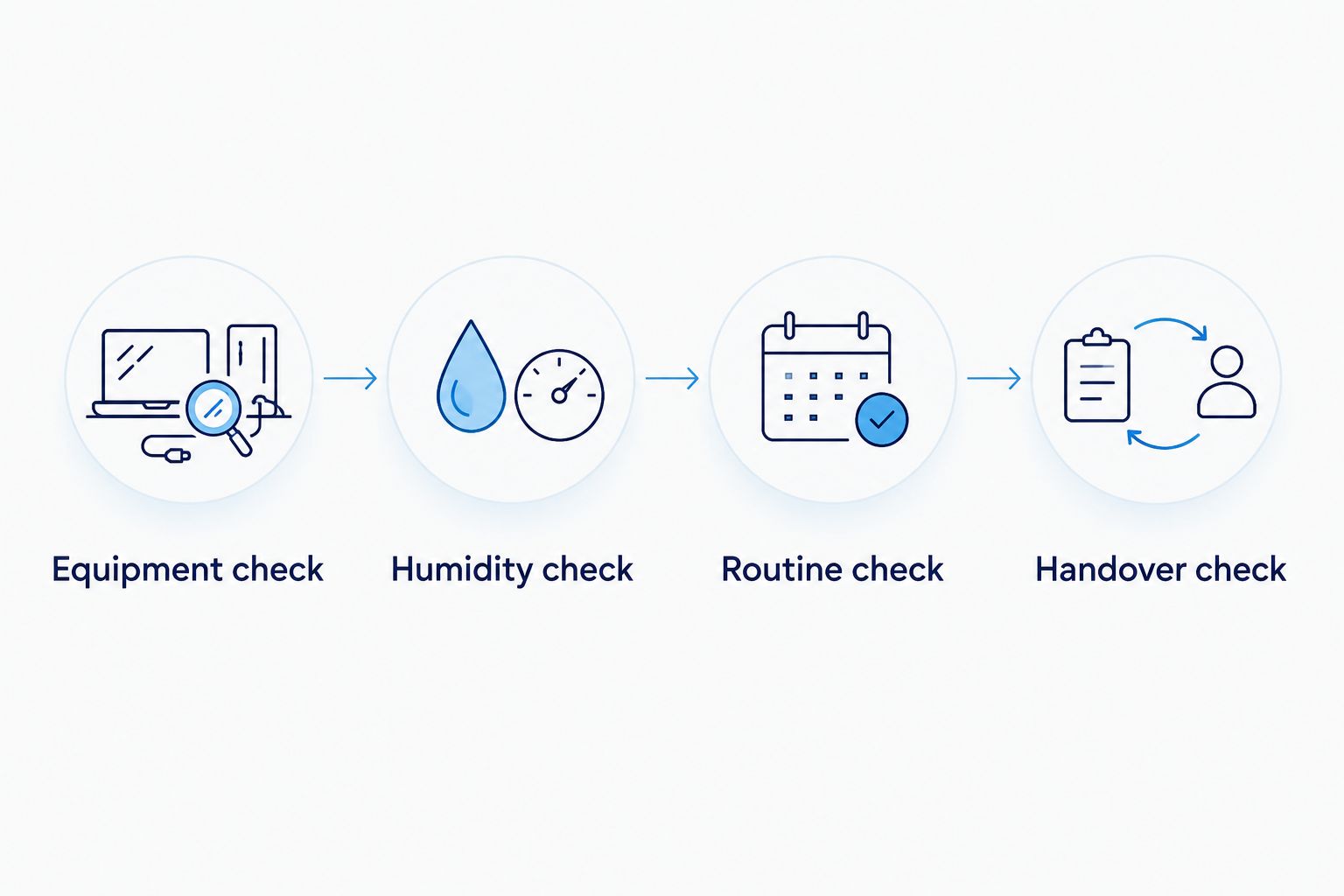
Equipment check
Have the indoor and outdoor equipment identified before choosing a thermostat. The technician should check the existing controller, wiring, and any zoning controls. Ask whether a proposed replacement preserves the system's current operating features.
This is particularly important when the existing controller exchanges detailed operating information with the equipment. A generic replacement is not automatically an upgrade. Losing a supported feature can outweigh the convenience of a new app.
Humidity check
Separate the features into humidity measurement, alerts, and active control. Ask which ones work with your specific AC. If a thermostat manages moisture through additional cooling, ask how that affects room temperature and what limits apply.
Your 2026 thermostat checklist should also include the fan setting. Continuous indoor fan operation can re-evaporate moisture remaining on a wet cooling coil after the compressor stops. Ask whether the manufacturer's recommended setup uses automatic fan operation for your system.
Routine check
Describe a normal weekday, a weekend, and periods when the home is empty. Decide whether you want a fixed schedule, manual remote adjustments, or supported automation. You don't need to enable every feature just because it is available.
For a seasonal residence, include someone who can respond locally if you receive a concerning alert. Remote access is most useful when the information leads to an appropriate action. Keep access limited to people who need it.
Handover check
Before installation is considered complete, have the technician demonstrate local operation and the features you selected. Confirm that cooling responds correctly and that you know how to override the schedule. Keep the model information and instructions accessible.
A successful handover leaves you able to control your home without searching through unfamiliar menus. Ask questions during the demonstration, particularly about what happens when the schedule and a manual adjustment conflict.
Will a smart thermostat lower my AC bill?
A smart thermostat can reduce unnecessary cooling if its settings change how your system operates. If it follows the same temperature pattern as your existing control, there is no basis for promising a lower bill. Convenience is a valid benefit even when savings are not established.
Evaluate your 2026 electricity use with weather, occupancy, and settings in mind. A lower bill during milder weather doesn't isolate the thermostat's effect. Avoid treating an app's estimated savings as a measurement of your home's actual savings.
Can a smart thermostat control humidity?
Some smart thermostats support humidity control with compatible equipment; others only display a humidity reading. Those are different capabilities. Ask what equipment action follows when the measured humidity exceeds the setting.
If the AC already cools the house but moisture remains high, investigate the cause. A thermostat adjustment doesn't replace a review of airflow, equipment sizing, or moisture entering the home.
Is a smart thermostat worth it if I'm home all day?
A smart thermostat is still useful if you value remote adjustments, supported room sensors, or humidity information. Its scheduling advantage is smaller when someone needs the same comfort setting throughout the day. Choose it for those specific functions rather than expecting absence-based automation to provide much benefit.
Get the system check before the sales pitch
A.R. Williams Air Conditioning is a fit for South Florida homeowners who want their AC options explained before work starts. For a smart thermostat decision, start with the equipment and the comfort problem you want to solve.
A.R. Williams Air Conditioning provides residential AC repair, installation, and maintenance. Technicians explain their findings and lay out the options, with flat-rate pricing quoted before work starts. That gives you a clear decision point rather than a reason to accept an unnecessary control upgrade.
The limitation of a thermostat upgrade remains the same regardless of the installer: it cannot repair an underlying airflow or equipment fault. A.R. Williams Air Conditioning's smart thermostat installation for South Florida homes is relevant when you want help assessing the control and its setup. Talk with a technician about compatibility before choosing the model.
FAQ
What’s the best reason to get a smart thermostat in Florida?
Remote access and scheduling that fit your household are strong reasons to get a smart thermostat in Florida. Humidity information is also useful when the selected model includes a sensor, but it does not replace a system assessment.
Is a smart thermostat better than a programmable thermostat?
A smart thermostat is better for remote adjustments and connected features, while a programmable thermostat suits a predictable routine without app management. Both require correct settings and compatibility with your equipment.
What indoor humidity should I look for on my thermostat?
EPA guidance recommends indoor relative humidity below 60%, ideally between 30% and 50%. If readings stay high, assess the moisture source and AC operation rather than relying only on a lower temperature setting.
Can I use any smart thermostat with my central AC?
No, a smart thermostat must match your central AC’s wiring and control requirements. Some advanced systems need a matching controller to retain their intended functions.
Will my AC stop if the thermostat loses Wi-Fi?
Losing Wi-Fi does not necessarily stop local cooling control, but behavior depends on the thermostat model. Confirm offline operation in the manufacturer’s instructions before installation.
Will a bedroom sensor fix uneven cooling?
A bedroom sensor can change which temperature a compatible thermostat uses, but it does not repair uneven airflow or create a separate zone. Check the cause of the room’s temperature difference before relying on a sensor.
Should I leave the indoor fan running all the time?
Continuous fan operation can return moisture from a wet cooling coil to the indoor air after cooling stops. Ask your technician to confirm the recommended fan setting for your equipment and humidity needs.
One last thing
Before you approve an upgrade, ask this question: "Which feature will work with my AC that I can't use today?" The answer should name a practical function, such as remote adjustments or supported humidity control. If it only describes a nicer screen, you have a clear reason to keep evaluating your options.
Related guides
- How to connect a zoning system to your smart thermostat
- How to reduce indoor humidity without overworking your AC
- AC maintenance for snowbirds and seasonal residents
