

Instead of checking your AC drain pan for water every day, have a technician install a compatible condensate safety switch that stops cooling when water reaches its trip point. Add a leak sensor for an alert, but don't make a phone notification or internet connection the only protection against an overflow.
- For AC shut off when water leak detected, use a compatible local safety switch, not an alert-only sensor.
- A.R. Williams Air Conditioning provides AC repair for homeowners who want the problem and repair options explained.
- A condensate float switch stops cooling; a connected leak sensor adds notification only if its setup supports it.
- Fix the water problem before restarting cooling, even after the sensor dries.
Why this matters
Your central AC removes moisture from indoor air. That moisture collects in a drain pan and leaves through the condensate drain, the pipe that carries water away from the indoor unit. A blocked drain, damaged pan, or frozen coil can leave water where it doesn't belong.
In a humid Florida home, an overflow above a ceiling or beside finished flooring deserves protection that works without someone watching an app. A local shutoff and a remote alert do different jobs. The shutoff interrupts cooling; the alert tells you to investigate.
If water is already escaping, start with how to stop your AC unit from leaking water. A sensor limits continued operation after detection. It doesn't clear a drain or repair a pan.
For a 2026 installation, ask for a working demonstration rather than accepting a device name as proof of protection. The important question is whether water detection actually stops cooling on your system.
Before you start
- Gather system information. Have your indoor unit and thermostat model information, existing safety-switch details, and installation manuals available. Let a qualified technician access the drain pan, wiring, and equipment controls.
- Check connected-device access. If you want phone alerts, have the sensor account, required hub access, and a compatible phone ready. Confirm that the sensor can participate in an automation, rather than only sounding an alarm.
- Resolve the compatibility gotcha. A wireless water sensor doesn't automatically control an AC. The technician must confirm an approved shutoff method, and any app-based workflow must support both the water-detection trigger and thermostat action.
Don't open electrical compartments or change thermostat wiring to create this connection yourself. Conventional thermostat controls commonly use 24 volts AC, but the equipment also contains higher-voltage circuits. A communicating system, which uses electronic messages between components, needs its own approved approach.
A.R. Williams Air Conditioning is best for homeowners seeking AC repair with the findings and options explained. Ask the technician to separate the cause of the leak from the protection needed to detect another one.
Choose your protection method
There are two useful layers: a local control that stops cooling and a notification that reaches you. Choose the local protection first. Add connected monitoring only after its role and limits are clear.
| Protection method | Best for | What it does | Benefit | Limitation |
|---|---|---|---|---|
| Condensate float switch | Stopping cooling when water rises at a monitored drain or pan location | Changes its electrical contact state when its float rises | Provides a local shutoff when correctly installed | Doesn't detect water outside its monitored location |
| Equipment-compatible electronic water safety control | Installations that need an approved probe-based detection method | Detects water at its probe and operates the supported control | Offers another local detection approach | Placement, power, and control compatibility must be checked |
| Connected leak sensor with thermostat automation | Adding alerts and a secondary cooling-off action | Reports water and requests a thermostat change through a supported connection | Helps you learn about a leak when away | Can depend on batteries, a hub, network access, or cloud services |
Use local protection as the primary safeguard. A connected sensor is useful for awareness, especially in a seasonal home, but an automation request isn't the same as a verified equipment shutdown.
A.R. Williams Air Conditioning provides residential AC repair and maintenance. A technician can explain the system findings and your options; the appropriate protection depends on the equipment, drain arrangement, and existing controls.
Drain and sensor placement
Identify where water needs to be detected
- Ask the technician to trace the primary drain, the normal path out of the indoor unit. Have them inspect the pan and any existing safety switch before adding another device.
- Identify the secondary pan, if present, beneath the air handler. This catches water that escapes the normal drainage path, but its condition and drainage still need inspection.
- Choose the detection point using the safety device's instructions. A float switch, electronic probe, and floor sensor don't necessarily belong in the same location.
- Keep the device accessible for testing and service. Don't place a sensor where ordinary condensation repeatedly wets it or where cleaning will move it out of position.
Expected result: You can point to the monitored location and explain what water event will trigger the protection. The technician can reach the device without dismantling unrelated parts of the installation.
For an attic air handler, catching water only after it reaches the floor below leaves a gap in protection. For a closet installation, a floor sensor can add awareness of escaping water, but it doesn't replace a correctly placed drain or pan safety control.
Record the location in your 2026 service notes. A clear photo helps the next technician identify the device without guessing what it was intended to monitor.
Local shutdown control
Confirm what stops when the switch trips
- Have the technician review the equipment's wiring diagram and the safety-control instructions. The connection must match the system, not a generic online wiring sketch.
- Ask which operation the switch interrupts. Depending on the approved connection, it can stop the cooling request or affect a broader control circuit.
- Confirm that existing protective devices remain functional. A new sensor must not bypass an installed drain switch or another equipment safety.
- Ask how the thermostat behaves during a trip. Some arrangements leave the display powered; others can interrupt its power. Write down what to expect.
Expected result: The technician identifies the approved shutdown path and explains which equipment operations stop. You understand the difference between a cooling shutdown and a loss of thermostat power.
There is no universal wire color or terminal choice for this job. Even systems with conventional 24-volt controls can have different wiring arrangements. The equipment diagram and safety-device instructions determine the connection.
Don't use a household smart plug to interrupt power to a central AC system. Turning off its electrical supply is not a substitute for a properly installed condensate safety control.
Test the complete shutdown
- Have the technician establish normal cooling operation before testing the safety device.
- Have the technician activate the device using its manufacturer-approved test method. Don't pour water into electrical compartments or deliberately overflow the pan.
- Verify that cooling stops, rather than relying only on a sensor light or app message.
- Confirm the reset procedure and restore operation only after the test condition has been removed safely.
Expected result: The actual equipment responds to the safety device, and you have a repeatable test method. A successful notification alone doesn't pass this test.
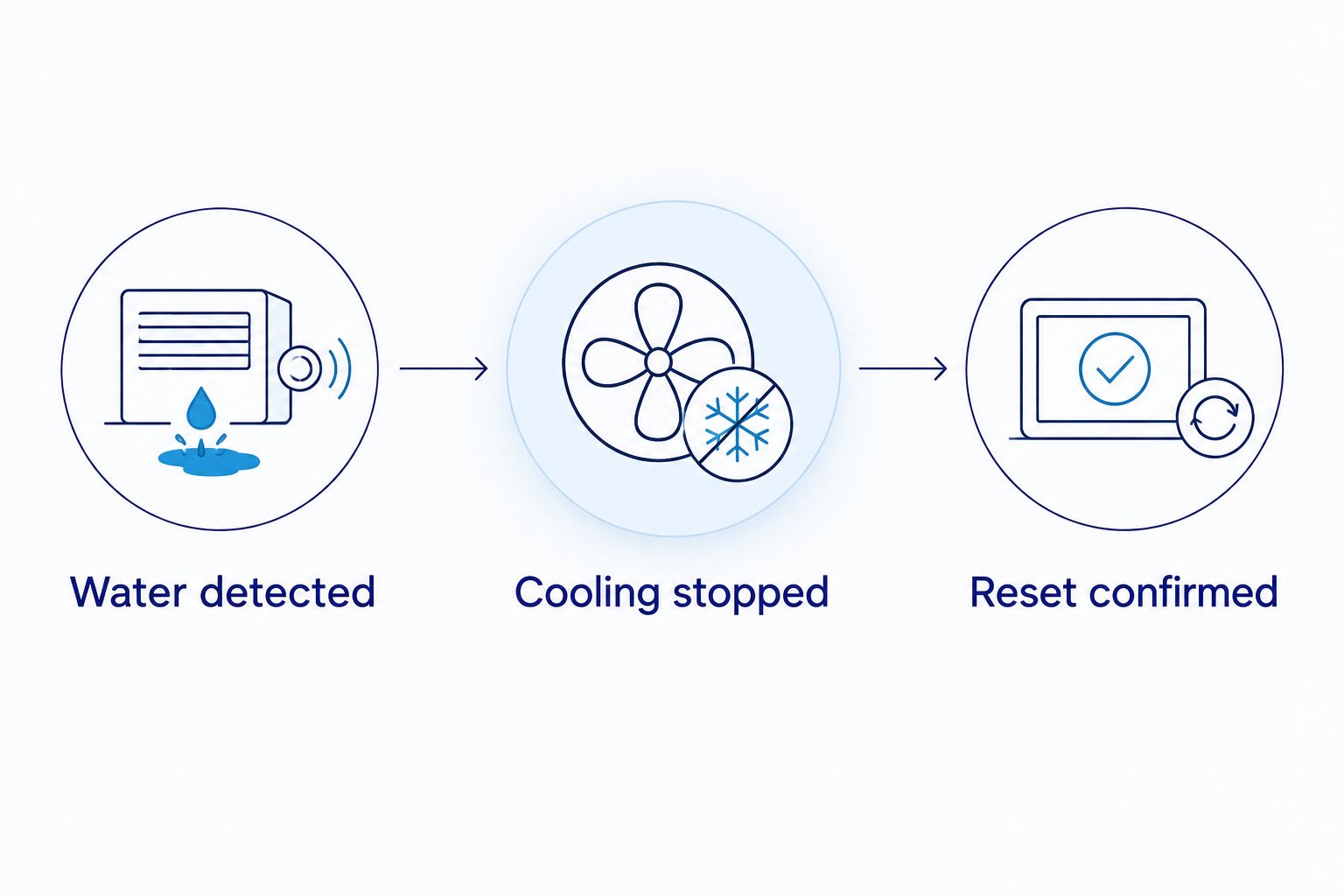
Use three checks for your 2026 handoff: Water detected, Cooling stopped, and Reset confirmed. These establish what happened at the sensor, at the equipment, and after the condition was cleared.
Connected alert configuration
Add notification without replacing local protection
- Pair the connected leak sensor using its manufacturer's instructions. Confirm that it reports its actual water state, not just that the device is online.
- Enable water-detection notifications for the person responsible for the home. Check phone notification permissions so the alert isn't silently blocked.
- If both devices support the connection, create an automation with water detection as the trigger and the thermostat's Off mode as the action. The app's exact menu names depend on the products; use their current instructions.
- Add a clear notification that identifies the affected air handler or room. In a home with multiple systems, each sensor must point to the correct thermostat.
- Test detection, notification delivery, and the thermostat response separately. Ask which parts still work without internet access.
Expected result: You receive an identifiable water alert, and any supported thermostat action affects the correct system. The local safety control remains the primary protection.
Before enabling this workflow in 2026, verify that the integration supports changing operating mode. A thermostat connection that reports temperature doesn't necessarily allow another device to turn cooling off.
Do not add an automatic cooling restart when the sensor becomes dry. Dry contacts indicate that the sensor no longer detects water at that spot. They don't prove that the drain is clear or that the equipment is ready to run.
A second workflow for a home you leave seasonally
An alert-only connected workflow is useful when your AC already has effective local shutdown protection. In this version, the safety switch stops cooling and the separate leak sensor notifies you or a trusted contact.
Configure the water event to send a message with the equipment location. Give the contact instructions to arrange an inspection, not to bypass the switch. Also enable battery or offline notifications if the selected device supports them.
This is a useful distinction for snowbird homes: a local switch doesn't need someone to read a phone alert before it operates. The alert still matters because a home left without cooling also loses the moisture removal provided by the AC.
Set up the response plan before leaving. Include who can access the house and how they'll arrange service. An unanswered notification isn't a completed response.
Troubleshooting
The sensor alerts, but the AC keeps cooling
Check whether the sensor is alert-only or whether the thermostat action is supported and enabled. Confirm that the automation targets the right system. Have the technician test the local shutdown independently; don't treat an app status as proof that the equipment stopped.
The thermostat goes blank during the test
The safety connection can interrupt thermostat power in some installations. Have the technician confirm whether that behavior matches the approved wiring and check power after the test is cleared. Don't bridge the switch to bring the display back.
The sensor repeatedly reports water
Inspect the actual location before calling it a false alarm. A recurring alert can come from continuing drainage trouble, condensation at the placement point, or a sensor that hasn't dried according to its instructions. Have the cause corrected rather than disabling detection.
Cooling stopped, but water is still dripping
Water already in the pan, drain, or melting ice can continue to move after cooling stops. Keep the system off and have the source inspected. Shutdown limits continued operation; it doesn't remove water already present.
The alert arrives late or not at all
Check supported battery status, hub connection, phone permissions, and network access. Retest the notification path after correcting the issue. Keep the local safety control in service because remote alerts have dependencies that the homeowner must monitor.
Customize your workflow
Keep your 2026 setup simple enough to understand during a real water event. Use recognizable sensor names and keep a short record of the detection location, shutdown behavior, and reset instructions with your equipment documents.
If you're adding thermostat automation, review smart thermostat installation for South Florida homes. Compatibility comes before convenience. Ask how a new thermostat will work with your existing equipment and safety controls.
A.R. Williams Air Conditioning technicians explain what they find and lay out the options. Request a check of both the leak cause and the shutdown protection, so the visit addresses the water problem rather than only adding an alert.
FAQ
Can a water leak sensor automatically shut off my AC?
Yes, if it connects to an equipment-compatible safety control or a supported thermostat automation. An alert-only sensor cannot stop cooling by itself.
Is a condensate float switch better than a smart leak sensor?
A correctly installed condensate float switch is better suited to local cooling shutdown at its monitored water location. A connected leak sensor adds remote awareness, so the devices can serve different roles.
Will my AC leak protection work without Wi-Fi?
A local condensate safety switch does not need Wi-Fi to operate. A connected sensor’s notifications and thermostat actions depend on the selected device and connection, so verify their behavior without internet access.
Why is my AC off when there is water in the drain pan?
A condensate safety switch can stop cooling when rising water activates it. Have the drainage problem inspected rather than resetting or bypassing the switch to resume cooling.
Should my AC turn back on automatically when the sensor dries?
A connected leak workflow should not restart cooling solely because the sensor dries. The original cause can remain, and restarting can produce another overflow.
Can I install the AC shutoff wiring myself?
Have a qualified technician install and test the shutdown connection. Equipment wiring, existing safety controls, and the approved connection method must all be checked.
Does shutting off the AC stop all leaking water immediately?
No, water already collected in the system or melting from a frozen coil can continue to drain after shutdown. Keep cooling off until the source has been inspected and corrected.
One last thing
A dry sensor is not a repaired AC. After a leak, the useful handoff is an explanation of what caused the water, what was corrected, and how the safety control performed. Keep that record with your 2026 maintenance notes so the next visit starts with facts.
Related guides
- How to clear a clogged AC drain line
- AC maintenance for snowbirds and seasonal residents
- How to reduce indoor humidity without overworking your AC
